Sunday, August 31, 2014
Sony Cyber shot DSC RX100 User Manual
The RX100 camera offers a generous choice of artistic options to expand shooting possibilities for enthusiasts and novice photographers alike. It includes the option for 6 different creative styles and a variety of popular picture effects including Toy Camera, Partial Color, HDR Painting and several others, most of which can be previewed directly on screen before shooting.
| Google Images |
The DSC-RX100 features Auto Portrait Framing function making it simple to create sharp, perfectly framed portraits. This unique feature automatically detects faces in a scene, crops the picture accordingly creates a tighter, pro-style composition at full resolution. Both the original and cropped photo are saved for review.
Similar to a DSLR-style interface, theres a choice of auto and manual focus modes on Cyber-shot RX100 for even greater control over your image. If youre focusing manually, MF Assist magnifies your image to simplify fine adjustments. Theres also a pro-style Peaking function that highlights sharply-focused areas of the image on screen.
Key Features of Sony Cyber-shot DSC-RX100:
- 20.2 megapixels 13.2 x 8.8mm Exmor CMOS sensor
- 3.0-inch Xtra Fine 1,229,000 dots LCD display with WhiteMagic
- 3.6x (28-100mm) F1.8-4.9 Carl Zeiss Vario-Sonnar T* Lens
- Optical SteadyShot image stabilization with Active Mode
- ISO 125-6400 (expandable to 25,600)
- 25-point autofocus system
- Ultra-Fast 0.13 Sec High-Speed AF
- MF Assist & Peaking
- Capture JPEG and/or RAW format for still images
- Capture still images in any of four aspect ratios - 1:1, 2:3, 4:3, or 16:9
- Multi-Frame Noise Reduction
- 10 fps Burst Mode
- 1920×1080 60p AVCHD full-HD video
- Digital level gauge
- P/A/S/M
- Face Detection & Face Registration
- iAUTO
- Superior Auto Mode
- Intelligent Scene Recognition (iSCN)
- Auto HDR Mode
- Sweep Panorama
- Auto Portrait Framing
- Creative Style
- Picture Effect mode
- Intuitive operation with Control Ring for creative photo shooting

Saturday, August 30, 2014
Pentax K 30 DSLR User Manual
K-30 features a Custom Image function, which allows the user to easily and quickly select the desired finishing touch for a particular image. Choose from 11 custom settings including Bleach Bypass that creates a dramatic visual effect similar to that used in motion pictures, and Cross Process to produce fanciful, eye-catching images boasting dramatic colors. The K-30 also offers a choice of 19 creative digital filters including Miniature, which transforms an actual scene into what appears to be an image of miniature models. These filters add distinctive visual effects to captured images producing creative, artistic images without the need for a computer. The user can further expand the creative possibilities by applying multiple filters and processing modes to a single image.
| Google Images |
K-30 also offers 19 Scene modes — including Night Scene Portrait, Pet and Backlight Silhouette — to simplify the photographing of subjects and scenes too complicated or too demanding for inexperienced digital SLR photographers, by optimizing all camera settings with a simple choice of the corresponding icon on the camera’s LCD monitor.
K-30s traditional shooting modes feature PENTAX Sensitivity Priority (Sv) and Shutter And Aperture Priority (TAv) for outstanding flexibility, while powerful automatic modes like Auto Picture mode, which automatically selects the most appropriate shooting mode for a given subject or scene from Portrait, Landscape, Macro and other distinctive shooting modes. The photographer can concentrate on image composition and shutter opportunity, while leaving all other camera settings to the K-30, including shutter speed, aperture, white balance, saturation, contrast and sharpness.
Key Features of Pentax K-30:
- 16.3MP APS-C CMOS Sensor
- weather-resistant, dustproof and coldproof design
- Shake Reduction mechanism with user-assisting functions
- Optical finder with nearly 100% field of view
- Newly developed SAFOX IXi+ AF module for improved autofocus performance
- 77 segment metering system
- 6 fps continuous shooting
- ISO up to 25600
- 920K dots 3-inch LCD screen
- Live View focus peaking
- Full 1080p HD video capture at 30 fps
- Programmable front and rear e-dials
- Traditional, Auto Picture and Scene modes
- In-camera HDR shooting modes
- Powered by Rechargeable Li-Ion or AA battery s (via optional D-BH109 AA battery holder)
Friday, August 29, 2014
Canon EF S 18 200mm f 3 5 5 6 IS Lens Instruction Manual
This is the primary analyze report in line with the Canon EOS 50D! It will likely be interesting to find out exactly how lenses can perform for this brand new standard video camera featuring its extremely substantial pixel density. The initial examination campaigner may be the new Canon EF-S 18-200mm f/3.5-5.6 IS Will be - not exactly an easy task for this intense variety zoom lens however the zoom lens is also bought as part of A system with the EOS 50D.
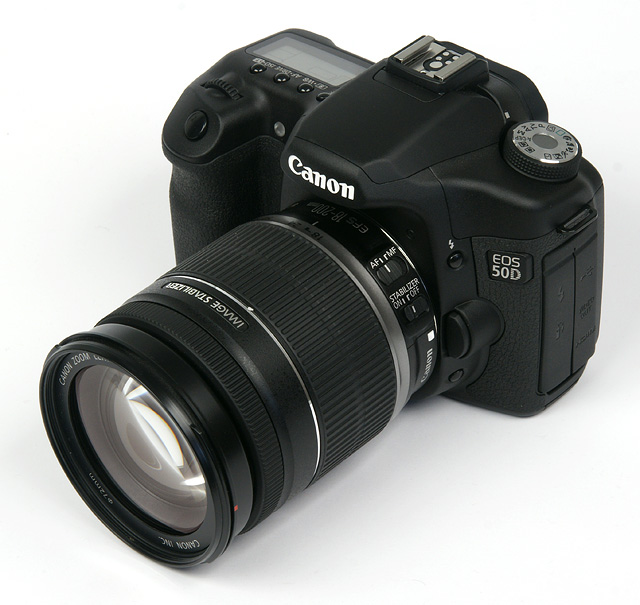
The construction in the Canon contact is all about typical and typical for lower-conclude Canon items. The actual plastic-type material excellent is pretty reasonable similar to the actual build specifications. This contact lens works on the and so-known as couple-cam system so as to prolong this optics when zooming for the very long stop on the zoom lens selection - remarkably theres no walking from the inner capsules fifty-fifty in the 200mm establishing the following. This move wedding ring operates reasonably even whilst the focus engagement ring feels cheap. The intended customers will most likely prefer to make use of AF so that is probably venial. It really is somewhat troublesome however that this concentrate hoop swivels for the duration of AF functions. The good thing is Rule was able to donjon a static movement component so it will be not a problem to utilize polarizers. The actual tried taste suffered a act from soar creep hence the move lock (18mm simply) will come useful sometimes.
When you begin utilizing it, be sure to look at this instruction manuals by way of fully to make certain appropriate functioning furthermore receiving the best possible performance out of your awesome. Encouraged and then to use after that keep this instructions in a approachable location so as to reference this while you want it. Through obtain in press button below, you can find total details about a new ware.
Download Canon EF-S 18-200mm f/3.5-5.6 IS Lens Instruction Manual
Thursday, August 28, 2014
Leica M Type 240 Users Manual
The new Leica R-Adapter M, which allows almost all Leica R-Lenses ever built to be mounted on the camera. The use of Leica R-System lenses now opens up vast new possibilities for zoom, telephoto and macro photography. The optional Visoflex EVF2 electronic viewfinder features 1.4M-dots high-resolution and a 90° swivel action for capturing images from unusual angles. It allows to use the LEICA M like a DSLR. You can Free Download Leica M (Type 240) Operating Instruction Guide / Owners Manual / Users Manual (PDF format):
.jpg) |
| Google Images |
The top and base plates of the Leica M are machined from solid brass, and the full-metal chassis is a completely self-contained, die-cast element manufactured from high-strength magnesium alloy. Specially designed rubber seals protect the camera body against dust and water spray. The glass covering plate of its LCD screen is manufactured from particularly tough and scratch-resistant Corning Gorilla glass. All this makes the Leica M particularly resilient and helps guarantee it a long and reliable working life.
Key Features of Leica M (Type 240) Rangefinder Digital Camera:
- 24 Megapixels Full-Frame 35mm CMOS Sensor
- 3-inch 920k-dots LCD with Corning Gorilla glass screen protector
- ISO up to 6400
- Live View and Live View Focus
- 1080p Full HD video capture
- Leica Maestro image processor
- Classic Rangefinder Design
- Intuitive Controls
- Quiet, Metal Blade Shutter
- M Mount Compatible
- Splash protected body
- Use the Leica R lenses with R-Adapter M
- Optional high-resolution electronic Visoflex viewfinder
- Optional multifunctional handgrip-M with integrated GPS
Download Leica M (Type 240) Users Manual (Owners Instruction) :
- Leica M (Type 240) Brochure
- (Leica M (Type 240) Operating Instruction Manual Download Available Soon...)
Wednesday, August 27, 2014
Fujifilm FinePix AX550 Manual
FinePix AX550 offer 720p HD at 30 fps movie capture that enables users to take stunning, detailed pictures and movies that can be enjoyed in ultra-sharp high definition on any HD ready television or PC. The Easy Web Upload function that allows you to sort through your photos on-camera and decide which ones to upload to Facebook or You Tube. Simply connect to a PC and launch the MyFinePix Studio software (for Windows) and they will immediately upload. You can Free Download Fujifilm FinePix AX550 Operating Instruction Guide / Owners Manual / Users Manual (PDF format) below.
 |
| Google Images |
The i-Flash Intelligent Flash offers a flash control system which efficiently controls the level of flash for a given exposure to produce beautifully balanced flash illumination across the foreground and background. Gone are the ugly washout shots where the subject is blasted with light and the background dark and unexposed.
AX550 feature Smile Detection that works with Fujifilm’s impressive Face Detection technology to detect smiles on faces – it will automatically releases the shutter when the smile appears so you wont miss the adorable smile the moment they happen.
Key Features of Fujifilm FinePix AX550:
- 16 Megapixels CCD sensor
- 2.7 inch LCD Screen
- FUJINON 5x (26mm-130 mm) wide angle optical zoom lens
- 720p@30 fps HD movie capture
- i-Flash Intelligent Flash
- Digital Image Stabilization
- Scene Recognition Auto (SR AUTO)
- Tracking Auto Focus (AF)
- Smile & Shooting and Blink detection
- Face Detection and Red-eye Removal
- Motion Panorama mode
- Use AA batteries
Tuesday, August 26, 2014
Canon 50d User Manual

The actual Canon EOS 50D its essentially any 40D consistency absorbed just about some sort of fresh-formulated xv mp sensing unit that at long last rectifies the specific situation where Canons XXD stove trailed the businesss access-plane range, inside picture element damage. Cannon is actually proclaiming how the brand-new sensors figure (unexampled producing operations, redesigned exposure diodes as well as tiny upgraded lenses) imply that in spite of the higher quality simulacrum noises features increased, anything we are going to live adding towards analyze later.
The other huge change would be the supplement of the brand-new, higher-image resolution LCD screen. 920,000 dots signify it could convey 640 x 480 RGB pixels, turning it into correctly A VGA stock observe. A few anti--mirror image layers that are part of the actual concealment complete their full capacity and keep this available inward undimmed weather condition, way too.
There are various various other improvements and also included attributes, with many different of them stemming from the unveiling with the Canons Digic several CPU. The key variations involving the 50D and also 40D ar thorough beneath.
Download Canon 50d User Manual PDF
Monday, August 25, 2014
Olympus VG 130 User Manual
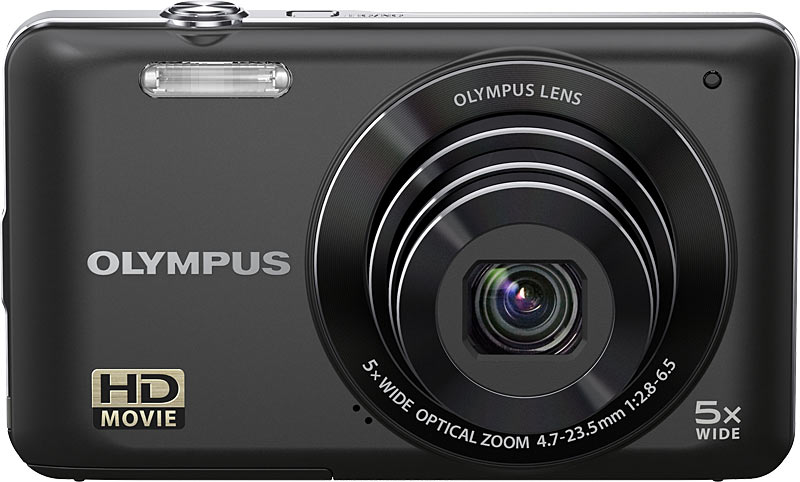 Olympus VG-130 comes with slim metal body, 3in screen, 5x zoom lens, 720p video mode. Olympus VG-130 operation is easy, with key settings appearing as a strip of icons down the right of the screen. Olympus VG-130 gives quick to access using the navigation pad.
Download Olympus VG-130 Manual here
Subscribe to:
Posts (Atom)